






Drawing up bank reconciliation statements in Odoo
Bank reconciliation statements are an important internal control tool in the process of preparing financial and accounting information. It is an essential accounting control in the process of making accounts reliable.
However, in most companies, the preparation process remains manual, due to the absence of tools or software to facilitate its preparation.
In this article, we'll look at how integrated accounting software such as Odoo can facilitate regular preparation, control and archiving.
Best practices in bank reconciliation
Production mode: manual, semi-automated or automated
During the webinar held on July 14, 2021, most of the participants stated that they set up bank reconciliations manually, using Excel as a tool.
Manual reconciliation can be tedious if the volume of transactions to be reconciled becomes large, or if weekly or daily reconciliations are required. It can also be a source of errors and manipulation (if the Excel file is not protected for reconciliation).
Market software such as Odoo enables semi-automated or automated reconciliations.
The semi-automated mode consists of performing bank reconciliation by importing statements and accounting entries, and punching directly into the accounting software, automatically clearing suspense items.
In automated mode, for example, bank data is automatically retrieved from your bank account (in read-only mode) and automatically reconciled according to defined reconciliation criteria (amount, direction, type of transaction, date, etc.).
Frequency: at least monthly
Best practice for the frequency of ERB preparation is at least monthly, in a formalized and supervised way.
However, depending on the volume of transactions, we recommend daily or weekly reconciliations.
Clearance of bank suspense accounts
Once the bank reconciliation statement has been drawn up, the suspense items on it must be carefully analyzed. Suspense items must be of a ‘normal’ nature:
- Recent date: suspense periods of more than three months require special attention. It is not normal to have suspense items on the bank's side (transactions recorded in the accounts but not entered in the bank).
- Normal sense of suspense: pay close attention to abnormal suspense. For example, a suspense concerning a cash deposit that has not been credited for more than one day, or a cheque that has not been deposited for more than 72 hours (ask yourself whether it has been rejected).
Supervision: at least one level of validation
After they have been drawn up (dated and signed), bank reconciliation statements must be reviewed by a line manager, who must also date and sign them before they are filed. The documents required for the review must be attached to the statement: ERB for the previous month, accounting ledger and bank statement (at least first and last page).
Filing and archiving
ERBs must be filed in a chrono (if they are drawn up manually) or the accounting period locked (automatic or semi-automatic reconciliation). As this is an accounting control document, it is advisable to keep them for the same length of time as legal accounting documents, i.e. 10 years.
How to create a bank reconciliation statement (BRS) in Odoo Accounting
The steps involved in setting up bank reconciliations in Odoo are as follows:
- incoming and outgoing payments are recorded in the Payments or Outgoing Payments module (suppliers)
- the bank statement is imported periodically (or synchronized with the bank)
- the accountant checks cash receipts and disbursements against the statement
- for unrecorded bank transactions (e.g. bank charges), you can create an entry template to be used to quickly book the transaction and avoid data entry.
Bank reconciliation in Odoo is facilitated by importing the bank statement (Excel or csv format).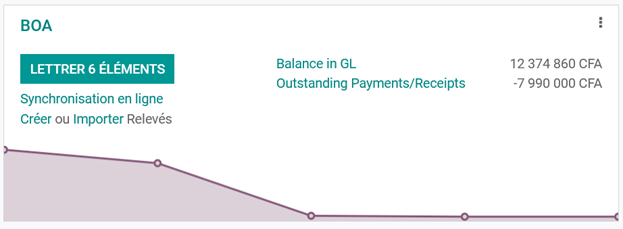
Reconciliation is performed directly in Odoo between statement and accounting transactions. Semi-automated reconciliation is available, based on the reconciliation template settings, making the reconciliation process simple and straightforward.
Use the shortcut buttons to create accounting entries manually:
When checking in, it's very easy to make accounting entries from the bank statement suspense using the shortcut buttons available in the «Manual operations» tab. These shortcuts are called reconciliation templates in Odoo.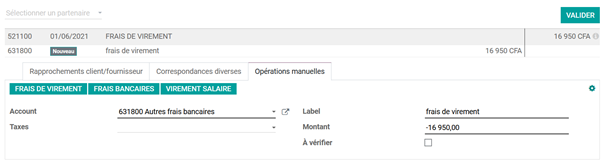
Suggest counterparty values :
Odoo automatically proposes counterparty values that simply need to be validated. This automation is based on the set of rules defined in the scoring models.
Establish correspondence with existing customer or supplier invoices:
This scoring model automatically selects the correct customer or supplier invoice corresponding to the payment..png)
Generate bank reconciliation statement
Once the accounting system and the statement have been reconciled, suspense items are automatically generated and appear on the bank reconciliation statement, edited from Odoo.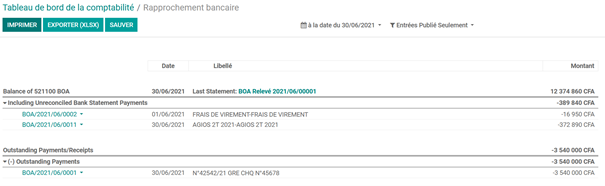
The ERB generated can be stored in the electronic document management module. Once reconciliation has been validated, previous accounting periods must be closed to avoid any changes to accounting entries.
About Moore Senegal
Moore Sénégal Consulting has been an Odoo partner for 10 years, and has deployed the solution for several customers in Senegal and the sub-region. What makes our approach special is that we have Odoo-certified consultants with business expertise: chartered accountants, management controllers, analysts, human resources consultants, etc. We also develop modules tailored to the needs of companies in Senegal.


